Candy Bar Wrapper Template (Free SVG Cut File — Any Size)
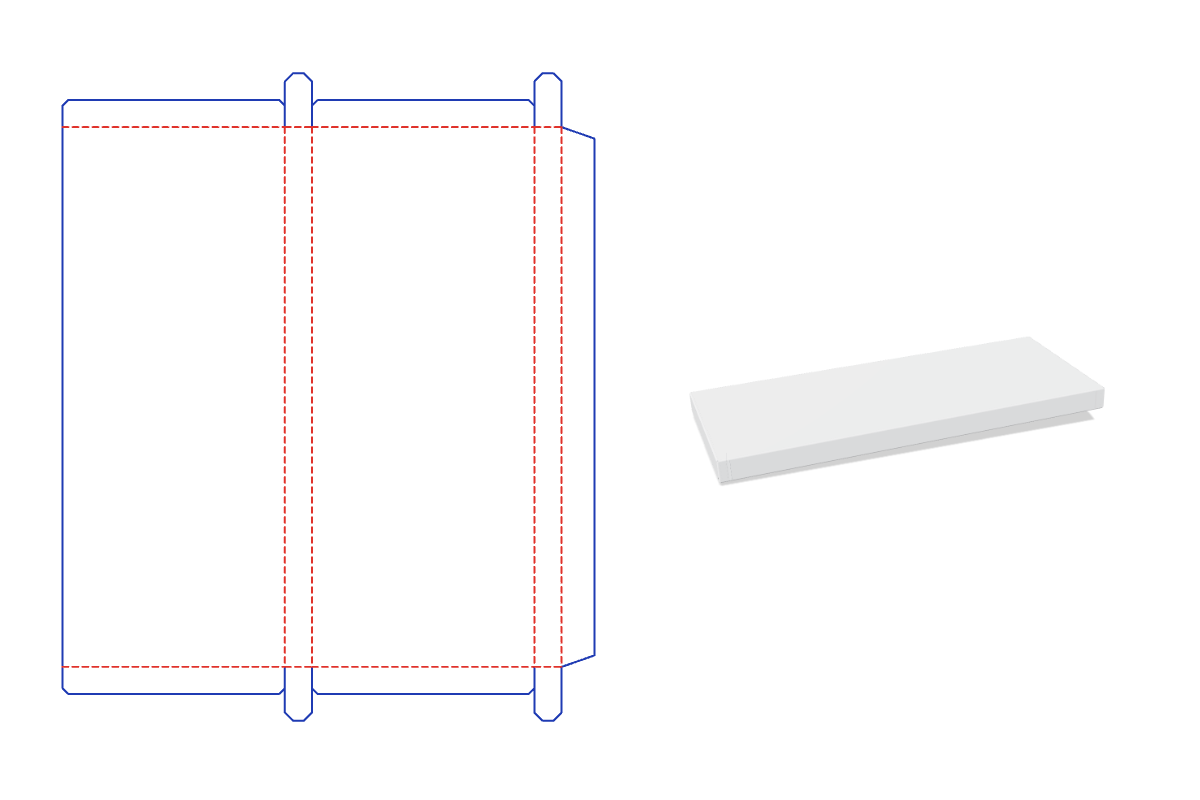
This free candy bar wrapper template makes a print-ready dieline at the exact size you type. Pick your options, preview it folded in 3D, and download a 1:1 SVG, PDF or DXF for your Cricut, Silhouette or laser cutter. No signup.
Customize the size in the editor →
What it's for
Use it for Christmas stocking stuffers, party favors, wedding and baby shower favors, teacher gifts and bake sales. You type your bar's length, width and thickness, so it fits a standard 1.55 oz bar, a 100 g tablet or a homemade bar from your own mould, instead of a one-size printable.
About this template
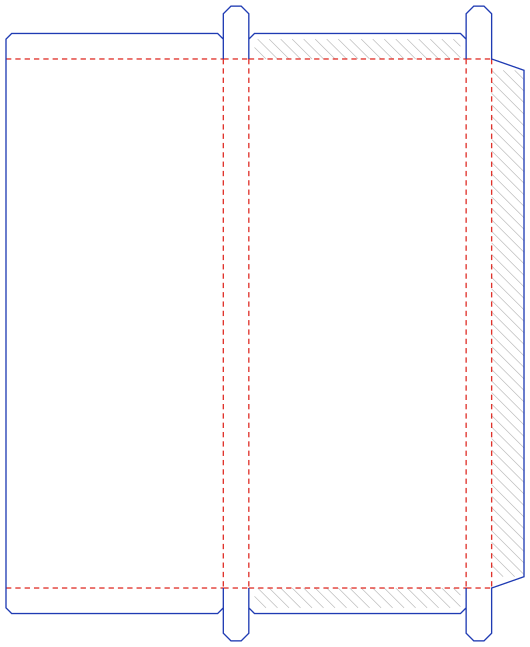
A printed paper wrap that goes around a chocolate bar, over its own foil. The flat piece has four panels scored to match the bar's front, edge, back and other edge, plus a glue strip that joins the seam on the back. A little ease is added so the wrap slides on. Choose how the ends close. Folded and glued ends: small edge flaps fold in and the end flaps glue over them, like a wrapped gift. Tuck-in ends: the front end flap has a tongue that slides inside, so it opens and closes again. Open sleeve: a shorter tube that leaves the bar's own wrapper showing at each end.
Common candy bar wrapper sizes
| Size | L × W × H (in) | L × W × H (mm) |
|---|---|---|
| Standard 1.55 oz bar | 5.5 × 2.25 × 0.25 in | 140 × 57 × 6.3 mm |
| 100 g tablet | 6.5 × 3 × 0.31 in | 165 × 76 × 7.9 mm |
| Homemade 100 g mould bar | 6.1 × 3.03 × 0.35 in | 155 × 77 × 8.9 mm |
The default is 5.5 × 2.25 × 0.25 in. Every size is adjustable in the editor.
How to assemble
- Print and cut. Print your design on the front panel, then cut around the outline. Score or fold every dashed line before you wrap.
- Wrap the bar. Lay the bar on the back of the front panel and wrap the panels around it. Glue the hatched strip under the back panel so the seam sits on the back of the bar.
- Close the ends. Folded and glued: fold the two small edge flaps in, fold the back end flap over them, then glue the front end flap on top. Tuck in: fold the edge flaps in, fold the front end flap over and slide its tongue inside along the back. Open sleeve: nothing to close.
- Check the fit. The wrap should slide on with a little room. If it is tight, measure the bar again in its foil and add a fraction to the width.
Materials and settings
The default material thickness is 0.006 in (0.15 mm); set your own in the editor to match your paper or board. Blue lines are cuts and red dashed lines are scores: in Silhouette Studio use Cut by Line Color, and in Cricut Design Space set the red fold lines to Score. Use thin paper or light card, about 100 to 120 gsm (27 to 32 lb text). The end flaps are only as tall as the bar is thick, about 6 mm on a standard bar, and heavy cardstock does not fold that small neatly. A full wrap for a standard bar fits one per US Letter or A4 page. The open sleeve fits two.
Download the default size
Free candy bar wrapper cut files at the default 5.5 × 2.25 × 0.25 in, exact 1:1 scale. Need another size? Customize it in the editor.
Download SVG Download PDF Download DXF
Candy Bar Wrapper FAQ
- What size should the candy bar wrapper template be?
- A standard 1.55 oz chocolate bar is about 5.5 × 2.25 × 0.25 in. The full wrap for it is about 5.4 × 6.6 in flat. Bars vary by maker, so measure yours in its foil and type the size.
- Can I make a candy bar wrapper without glue?
- Choose tuck-in ends: the ends close with a tongue and reopen, so only the long seam on the back needs glue or a strip of double-sided tape. Tuck ends hold best on bars at least 8 mm thick.
- Will the candy bar wrapper print on US Letter?
- Yes. A full wrap for a standard bar or a 100 g tablet fits one per Letter or A4 page, and the open sleeve for a standard bar fits two per page.
- Is the candy bar wrapper template free?
- Yes. It runs free in your browser with no signup and no watermark, and what you make is yours and free to use.
- Which files do I get, and do they work with Cricut and Silhouette?
- You get a 1:1 PDF, SVG and DXF. Use SVG for Cricut Design Space and Silhouette Designer Edition, or DXF for the free Silhouette edition. Blue lines cut and red lines score.